Working with invoices and payments in CRM:
Selection of payment system
Process automation begins from choosing a payment system. In CRM you can set up completely different payment systems – from simple payment via a link to large payment aggregators. The type of payment system is determined depending on business needs and how flexible a solution is required:
Connecting the finished module
There are already built-in payment systems inside the CRM system (PayPal, LiqPay and others) to connect which you need to perform a simple setup inside the CRM. This solution is suitable for making direct payments via chat or correspondence.
Self-written web service.
If the process of processing and posting funds needs to be customized taking into account the specifics of the company’s activities (data aggregation, auxiliary notifications, etc.), our specialists develop a custom solution in the form of a self-written web service for a processing center that works directly with the bank. However, for the user, this is still the same link to payment.
Generation of accompanying documents
Before issuing an invoice, many documents are always completed (filling out forms, signing up for a service, drawing up a simple invoice, etc.). All these procedures turn into a hated routine for employees and, as a rule, delay the entire transaction cycle for the company.
Our company’s specialists study all the features of the client’s business process in order to customize the car. generation of documents at each stage of the transaction: templates of all documents are entered into the client’s CRM, and custom fields in them are filled in automatically from the deal, contact or company card. As a result, you minimize the possibility of errors in documents and relieve the workload of employees.
Payment in a couple of clicks
There are 2 main scenarios for working with payments in CRM:
Auto
the manager transfers the transaction to the payment stage, the system generates a unique payment link and sends it via SMS or Email to the client.
Manual
the manager independently starts the process of creating a payment link, copies and sends it to the client in any convenient way from the CRM.
Synchronization of invoice status and order status
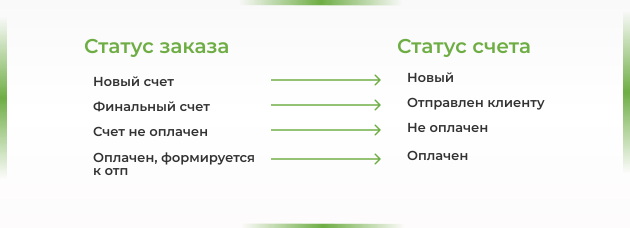
One of the great benefits of working in CRM system is what your mmanagers will always know the status of accounts – whether they are paid or not.
Since payment can take place in several stages, the system allows you to configure several stages of the invoice to suit your needs and synchronize these statuses with the accounting program.
Communications in working with accounts
The CRM system allows you to inform selected users about everyone changes in statuses payments.
For the supervisor
For the manager
For the client
Customized solutions for calculations during creation accounts
The CRM system can automatically calculate the necessary parameters depending on the amount or type of transactions:
sellers’ commission, discount amount, bonus amount, and so on.
Reporting and analytics
In CRM, it is possible to set up analytics based on the general parameters of the company’s work, as well as create reports based on the personal criteria of the manager:
reports on the work of managers, the number of (un) successful transactions, by sources, by clients, and so on.
Interested in a business automation service or need a consultation?
Fill out the contact form and expect a call from our manager within a few hours.
- phone_iphone
- mail_outline
- room
- access_time